Basic Debian build for docker-ce (vmware based)

Had a friend ask about this, so I thought I would write up really quick what I do.

First grab the netinst version of Debian — it's a small CD image that contains just the core Debian installer and a small core set of text-mode programs (known as "standard" in Debian). To install a desktop or other common software, you'll also need either an internet connection or some other Debian CD/DVD images.

Basic hardware requirements for your VM depend on what you want, but I would start with 4 vCPUs, 8GB RAM, and 64GB of HDD.

Once you get your VM up and running, SSH into it and start installing Docker. Here is the official guide.

Set up the repository

  1. Update the apt package index and install packages to allow apt to use a repository over HTTPS:

    sudo apt-get update
    sudo apt-get install \
        ca-certificates \
        curl \
        gnupg \
        lsb-release
  2. Add Docker's official GPG key:

    sudo mkdir -p /etc/apt/keyrings
    curl -fsSL https://download.docker.com/linux/debian/gpg | sudo gpg --dearmor -o /etc/apt/keyrings/docker.gpg
  3. Set up the repository:

    echo \
      "deb [arch=$(dpkg --print-architecture) signed-by=/etc/apt/keyrings/docker.gpg] https://download.docker.com/linux/debian \
      $(lsb_release -cs) stable" | sudo tee /etc/apt/sources.list.d/docker.list > /dev/null

pfsense gaming

Update: there is a newer version of this post covering pfSense 2.9.0, including a couple of things that changed since this was written — pfSense Gaming NAT Setup, Updated for 2.9.0.

I see this question asked a lot on both reddit and the pfsense forums, so I wanted to share what I did to get open NAT and let my kids be able to game without all the fluff that is out there...

This is my current hardware specs, not that this has any bearing on what's to be done:
Intel(R) Core(TM) i3-9100T CPU @ 3.10GHz
4 CPUs: 1 package(s) x 4 core(s)
AES-NI CPU Crypto: Yes (active)
QAT Crypto: No
16G Ram
500G nvme

Let's start from the top and go to...

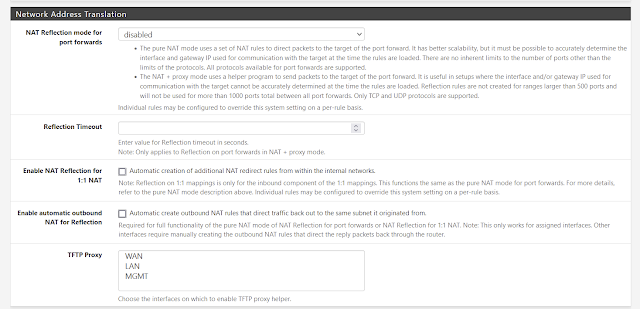
System / Advanced / Firewall & NAT

head down to the Network Address Translation section, I disable NAT reflection unless absolutely necessary.


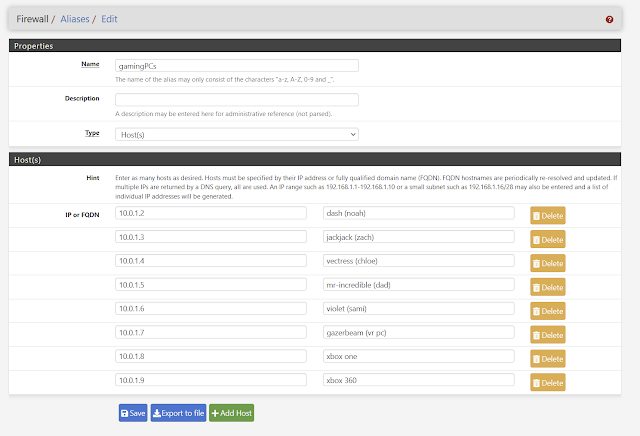
Firewall / Aliases / IP

Only part we are concerned with is the gamingPCs rule.


Click add and create the rule to match how many gaming PCs/Consoles you have on your network and what their IPs are... you should either set them as static IPs or give them static DHCP reservations for this to work properly.


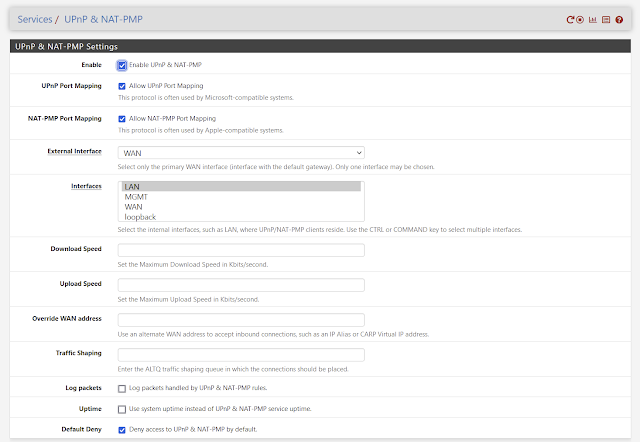
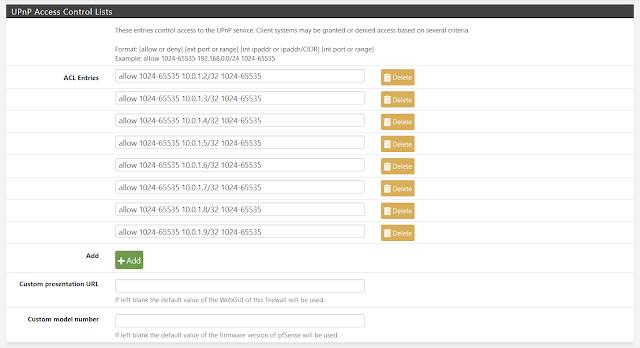
Services / UPnP & NAT-PMP


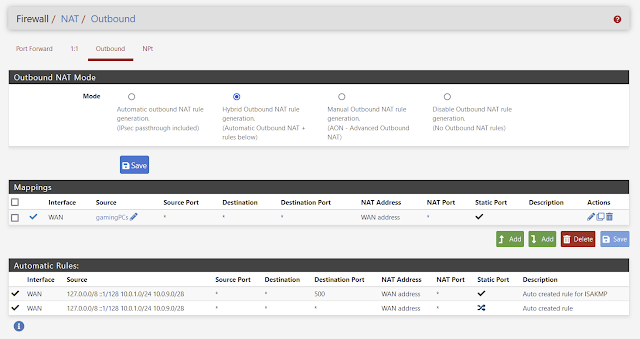
Firewall / NAT / Outbound


Under Mappings, create a new rule for your gamingPCs.


I think this is it... The only parts I did not cover is setting either a DHCP reservation or static IP for your gaming PCs/Consoles. You can find that documentation on the pfsense forums.

Hope this helps.